Navigate real-name verification, e-ticket issuance, and passport-linked bookings on 12306 and Trip.com
Learn every post-payment step required to complete a valid ticket booking in China as a foreign passport holder. This tutorial covers real-name verification, passenger name record accuracy, and platform-specific quirks that silently break foreigner bookings.
TL;DR
- Payment ≠ ticket – A successful payment on Chinese booking platforms does not guarantee a valid e-ticket. Always verify your order status shows “Ticketed” or “Confirmed” before travel day.
- Passport precision is everything – Enter your passport number and name exactly as printed on the machine-readable zone. A single wrong character will get you denied at the gate with no override.
- Plan for verification delays – Identity verification on 12306 takes 3–5 days for foreign passport holders. Start the process well before you need to book, or use Trip.com for faster English-language booking.
- Bring your physical passport everywhere – You board trains, enter attractions, and collect paper tickets using the original passport linked to your booking. Screenshots of your passport won’t work.
- Screenshot all confirmations – Spotty internet at stations and attractions means your in-app QR code might not load when you need it. Save offline copies of every booking reference, QR code, and confirmation number.
What You’ll Achieve: A Valid, Usable Ticket in Your Name
By the end of this tutorial, you’ll know how to navigate the full ticketing process on Chinese booking platforms as a foreign passport holder. That means getting past the payment screen and through the steps that actually produce a valid, scannable ticket tied to your identity.
Your success criteria are simple: you hold a confirmed booking with a correct passenger name record, your passport details match exactly, and you can board your train, enter your attraction, or catch your flight without being turned away at the gate. Most guides stop at “click pay.” This one covers everything that happens after, because that’s where foreigner-specific bookings silently break.
Prerequisites and Setup: What You Need Before You Start
Before touching any booking app, make sure you have the following ready. Missing even one item can stall your booking for days.
- Your passport (the physical document you’ll carry in China, not an expired one or a scan of a different passport)
- A working payment method: Alipay (international version), WeChat Pay, or a Visa/Mastercard (expect a 3–5% surcharge on some platforms)
- A Chinese phone number or international number linked to your app accounts
- The Trip.com app or 12306 app installed and updated (12306 is Chinese-only; Trip.com offers English)
- A selfie-ready phone camera for identity verification on 12306
- Time buffer: identity verification for foreigners on 12306 can take 3–5 days, so don’t start this the night before travel
Estimated time: 20–40 minutes for your first booking (excluding verification wait times). Subsequent bookings take under 10 minutes.
Why This Foreigner-Specific Workflow Exists
China’s domestic booking systems are built around the Chinese national ID card, a single 18-digit number that links identity, payment, and e-ticket issuance seamlessly. When you use a passport instead, you’re entering a parallel workflow with different validation rules, different verification timelines, and different failure modes.
The core problem isn’t payment. International cards and Alipay’s international wallet both work on major platforms. The problem is that a successful payment does not guarantee a valid ticket. Your booking can fail silently if your passport number has a typo, your name format doesn’t match what the system expects, or your identity verification is still pending.
This tutorial treats the process as a foreigner-specific pipeline with distinct checkpoints. We’ll use Trip.com (English-friendly, accepts foreign cards) and 12306 (the official China Railway platform) as primary examples, with notes on attraction tickets where the flow diverges.
Step 1: Set Up Your Account with Passport-Linked Identity
On Trip.com
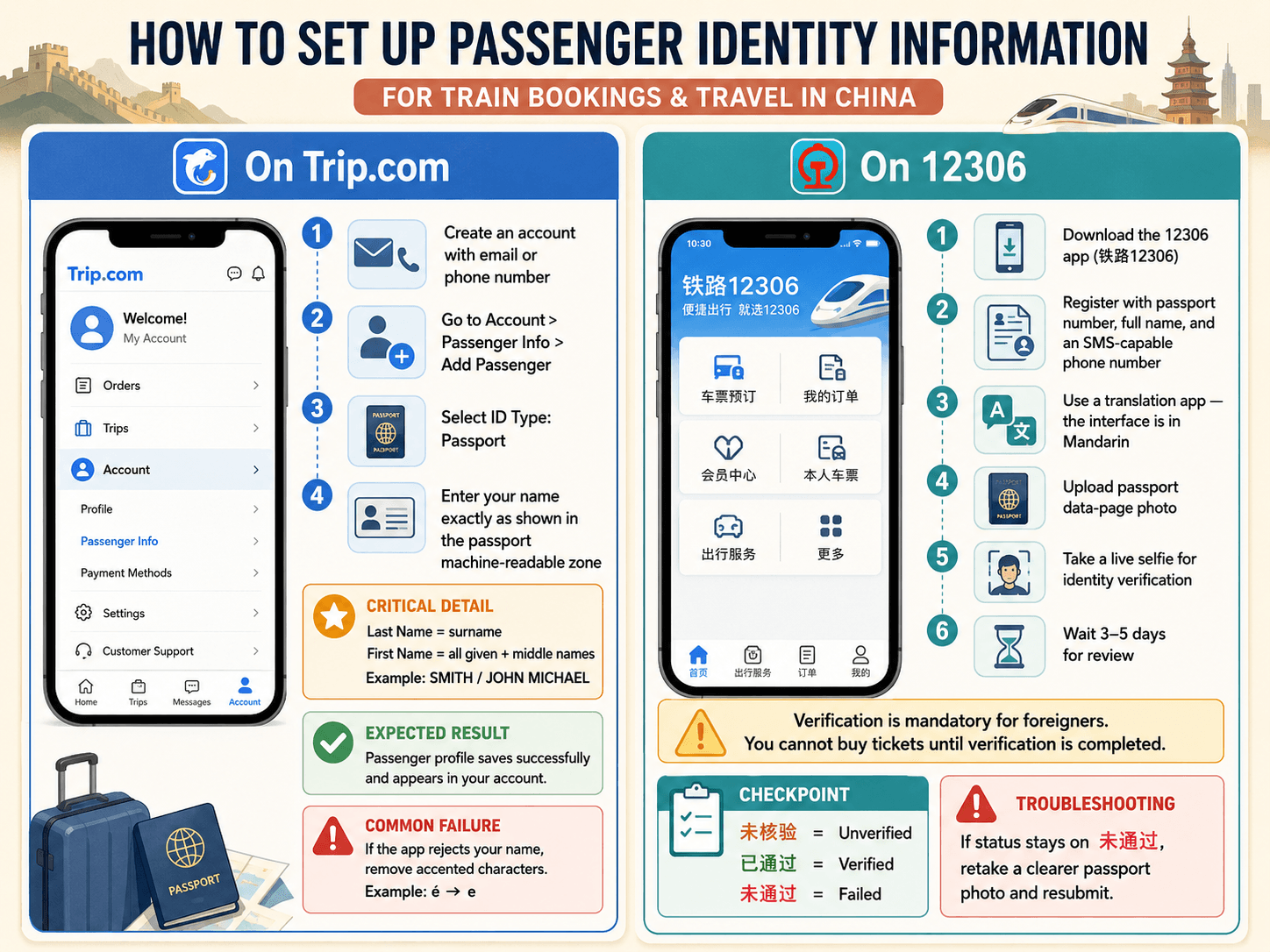
Open the Trip.com app and create an account using your email or phone number. Navigate to Account > Passenger Info > Add Passenger. Select “Passport” as the ID type. Enter your full name exactly as it appears on your passport’s machine-readable zone (the bottom of the photo page).
Critical detail: Enter your surname in the “Last Name” field and all given/middle names in the “First Name” field. Do not use nicknames, abbreviations, or rearrange the order. If your passport reads “SMITH, JOHN MICHAEL,” enter Last Name: SMITH, First Name: JOHN MICHAEL.
Expected result: Your passenger profile saves without error. You’ll see it listed under your account.
Common failure: If the app rejects your name, check for accented characters. Some systems strip diacritics (é becomes e). Enter the simplified ASCII version.
On 12306
Download the 12306 app (search “铁路12306” in your app store). Register with your passport number, full name, and a phone number that can receive SMS. The app is entirely in Mandarin, so keep a translation app ready.
After registration, you must verify your identity. The app will prompt you to upload a photo of your passport’s data page and take a live selfie. This step is mandatory for foreigners and can take 3–5 days to process. Until verification completes, you cannot purchase tickets on 12306.
Checkpoint: Your account status should change from “未核验” (unverified) to “已通过” (verified). If it stays on “未通过” (failed), your passport photo was likely unclear. Retake and resubmit.
Step 2: Enter Your Passport Number Exactly Right
This sounds trivial. It is the single most common reason foreigner bookings fail at the gate.
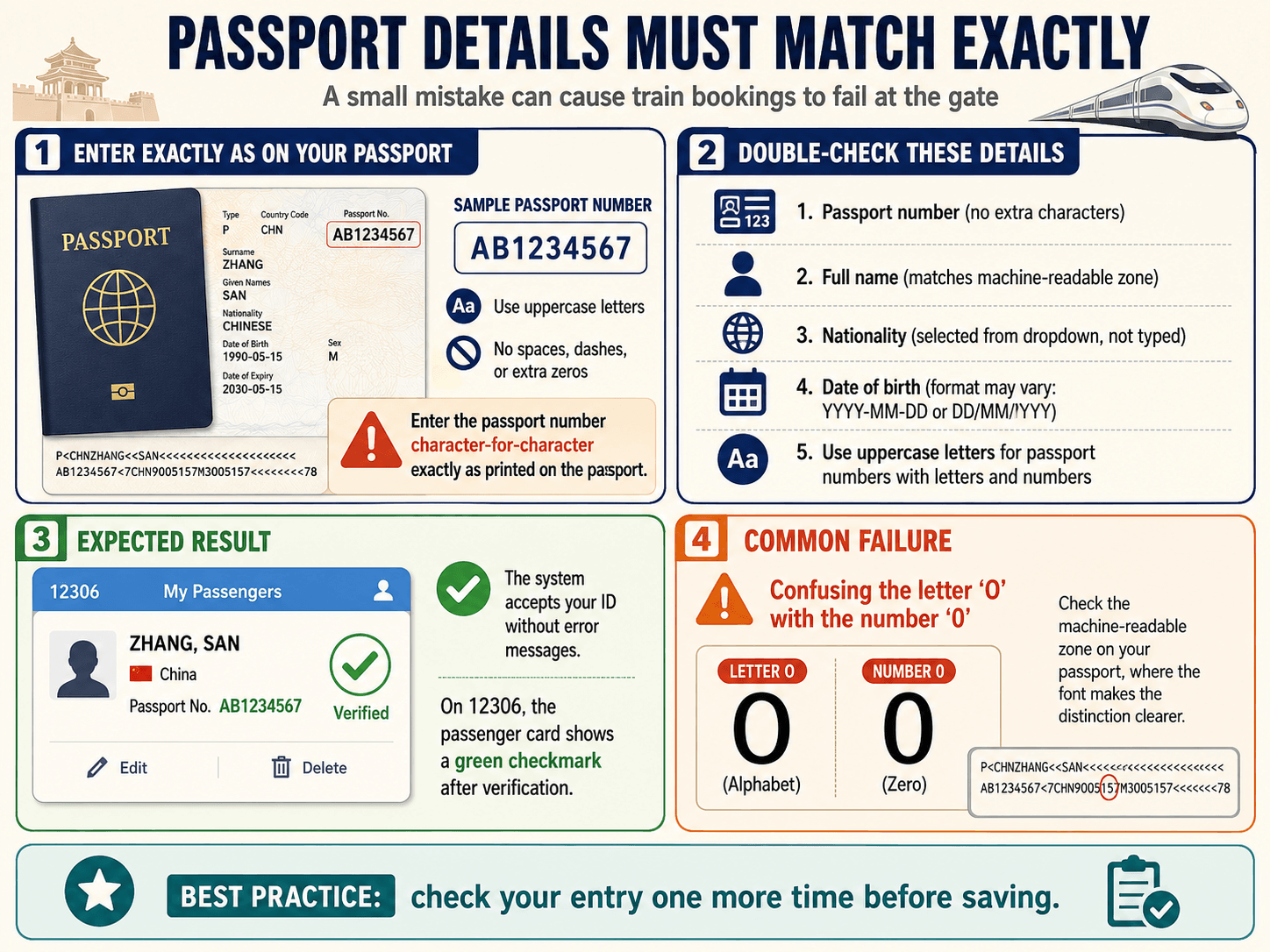
Your passport number must match character-for-character what’s printed on your document. Some countries issue passports with letters and numbers (e.g., “AB1234567”). Enter the letters in uppercase. Do not add spaces, dashes, or leading zeros that aren’t printed.
Double-check these details after entry:
- Passport number (no extra characters)
- Full name (matches machine-readable zone)
- Nationality (selected from dropdown, not typed)
- Date of birth (some apps use YYYY-MM-DD, others DD/MM/YYYY)
Expected result: The system accepts your ID without error messages. On 12306, the passenger card will show a green checkmark after verification.
Common failure: Confusing the letter “O” with the number “0” in your passport number. Check your passport’s machine-readable zone, where the font makes the distinction clear.
Step 3: Search and Select Your Ticket
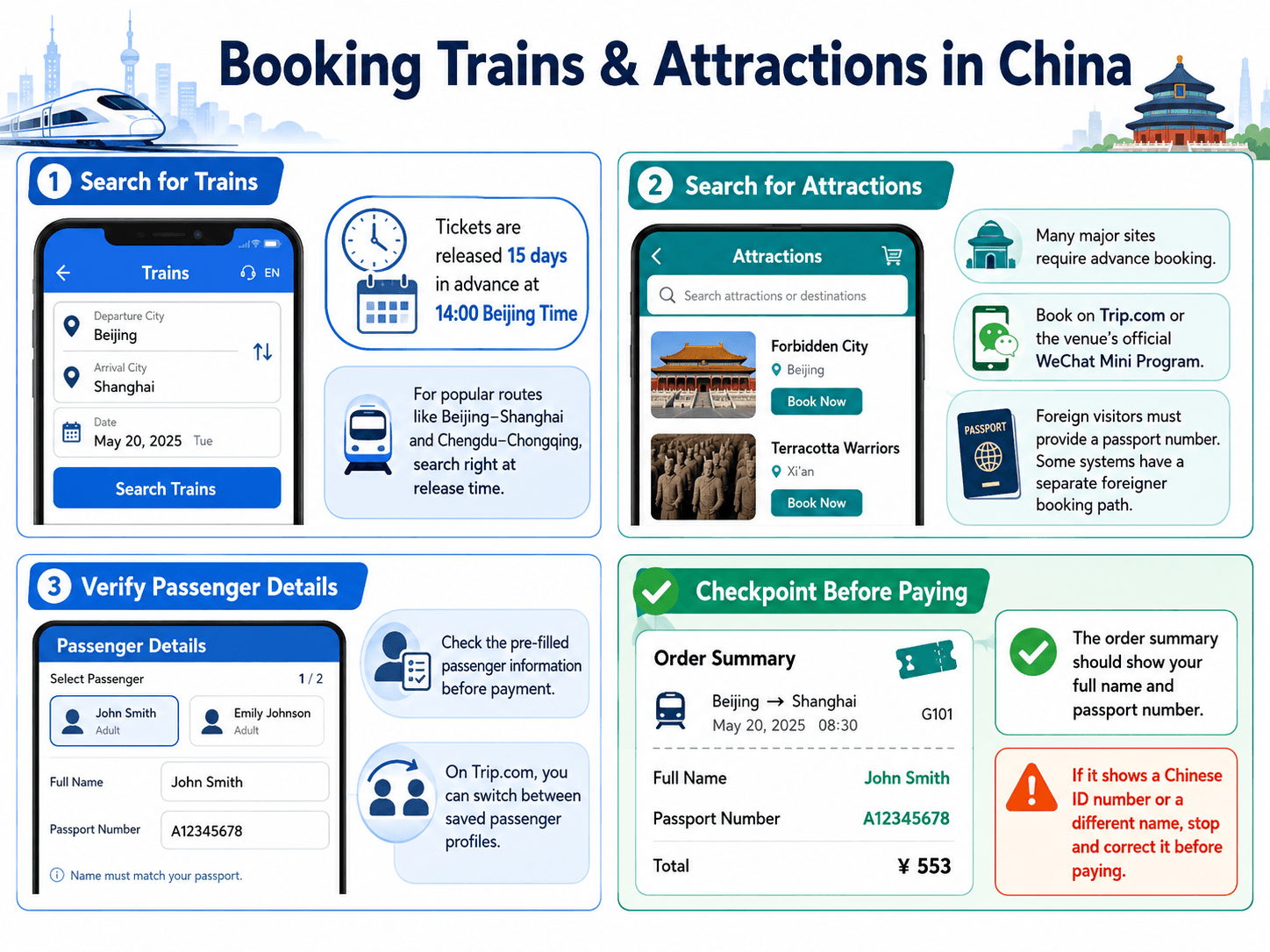
For trains: Enter your departure city, arrival city, and date. China railway tickets are released 15 days in advance at 14:00 Beijing Time, so for popular routes (Beijing–Shanghai, Chengdu–Chongqing), search right at release time.
For attractions: Many major sites (the Forbidden City, Terracotta Warriors) require advance booking. Search the attraction name on Trip.com or the venue’s official WeChat Mini Program. Foreign visitors must provide their passport number during booking, and some systems have a separate “foreigner” booking path.
Select your ticket and proceed to the passenger details screen. Verify that the pre-filled passenger information is correct before moving to payment. On Trip.com, you can toggle between passengers if you’ve saved multiple profiles.
Checkpoint: The order summary should display your full name and passport number. If it shows a Chinese ID number or a different name, stop and correct it before paying.
Step 4: Complete Payment Without Losing Your Booking
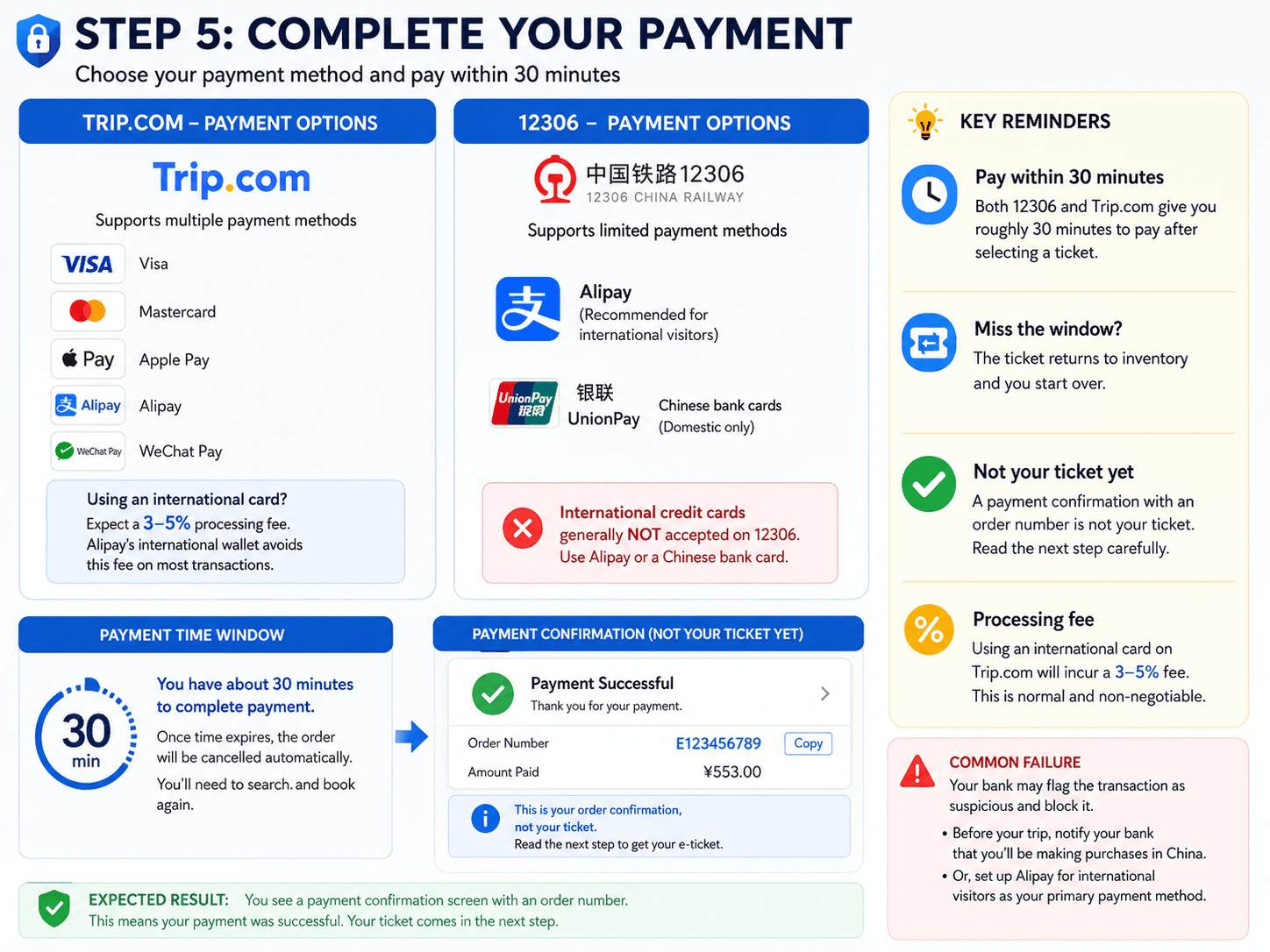
Choose your payment method. On Trip.com, Visa, Mastercard, Apple Pay, Alipay, and WeChat Pay are all supported. On 12306, Alipay and Chinese bank cards work; international credit cards generally do not.
If you’re using an international card on Trip.com, expect a 3–5% processing fee. This is normal and non-negotiable. Alipay’s international wallet avoids this fee on most transactions.
Complete the payment within the time window. Both 12306 and Trip.com give you roughly 30 minutes to pay after selecting a ticket. If you miss this window, the ticket returns to inventory and you start over.
Expected result: A payment confirmation screen with an order number. This is not yet your ticket. Read the next step carefully.
Common failure: Your international bank flags the transaction as suspicious and blocks it. Before your trip, notify your bank that you’ll be making purchases in China. Alternatively, set up Alipay for international visitors as your primary payment method.
Step 5: Verify Your E-Ticket Issuance (Don’t Skip This)
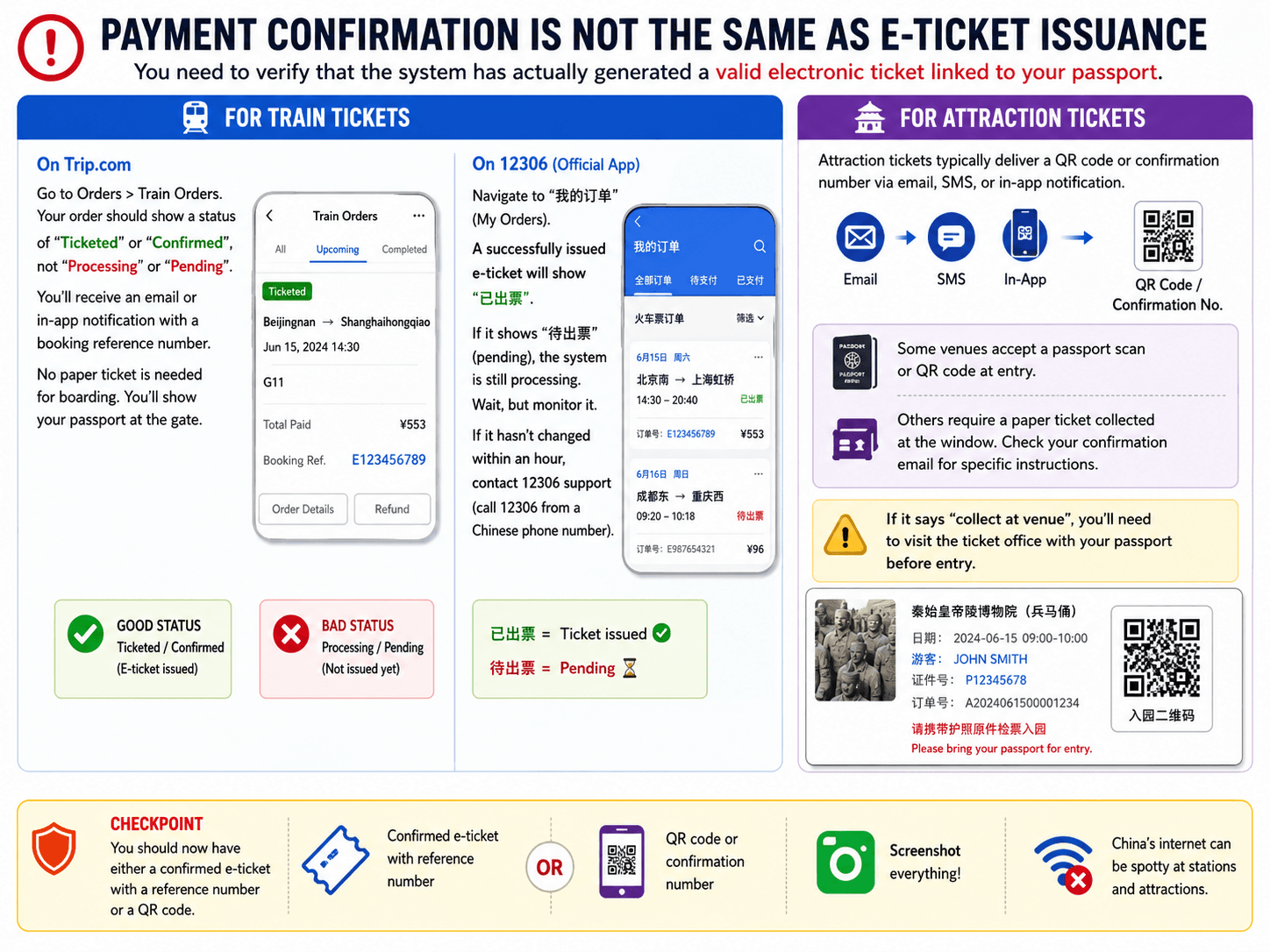
This is where most guides end and where most foreigner problems begin. Payment confirmation is not the same as e-ticket issuance. You need to verify that the system has actually generated a valid electronic ticket linked to your passport.
For Train Tickets
On Trip.com: Go to Orders > Train Orders. Your order should show a status of “Ticketed” or “Confirmed,” not “Processing” or “Pending.” You’ll receive an email or in-app notification with a booking reference number. No paper ticket is needed for boarding. You’ll show your passport at the gate.
On 12306: Navigate to “我的订单” (My Orders). A successfully issued e-ticket will show “已出票.” If it shows “待出票” (pending), the system is still processing. Wait, but monitor it. If it hasn’t changed within an hour, contact 12306 support (call 12306 from a Chinese phone number).
For Attraction Tickets
Attraction tickets typically deliver a QR code or confirmation number via email, SMS, or in-app notification. Some venues accept a passport scan or QR code at entry, while others require a paper ticket collected at the window. Check your confirmation email for specific instructions. If it says “collect at venue,” you’ll need to visit the ticket office with your passport before entry.
Checkpoint: You should now have either a confirmed e-ticket with a reference number or a QR code. Screenshot everything. China’s internet can be spotty at stations and attractions.
Step 6: Match Your Passenger Name Record to Your Physical Passport
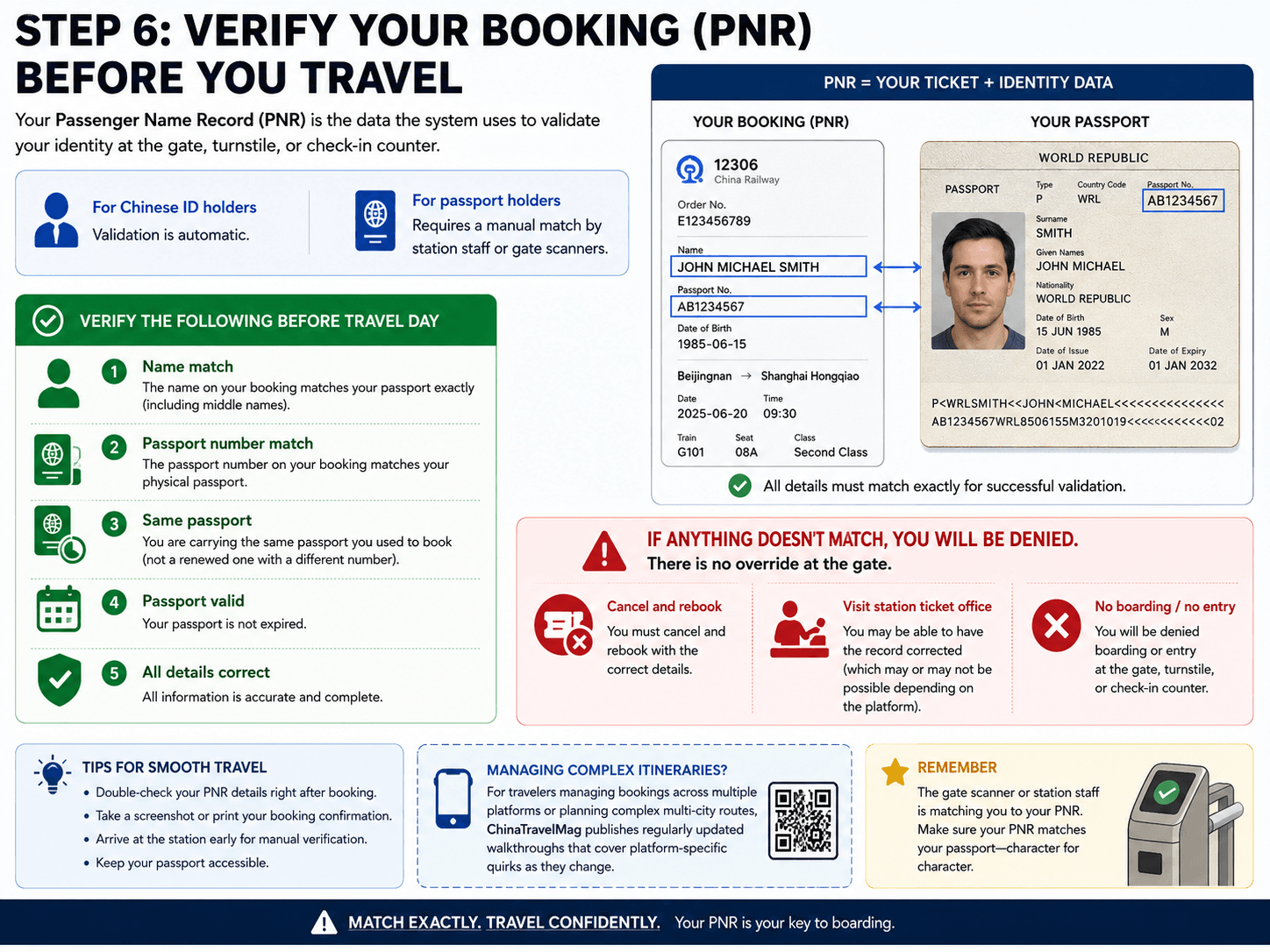
Your passenger name record (PNR) is the data the system uses to validate your identity at the gate, turnstile, or check-in counter. For Chinese ID holders, this is automatic. For passport holders, it requires a manual match by station staff or gate scanners.
Verify the following before travel day:
- The name on your booking matches your passport exactly (including middle names)
- The passport number on your booking matches your physical passport
- You are carrying the same passport you used to book (not a renewed one with a different number)
- Your passport is not expired
If anything doesn’t match, you will be denied boarding or entry. There is no override at the gate. You must cancel and rebook with the correct details, or visit a station ticket office to have the record corrected (which may or may not be possible depending on the platform).
For travelers managing bookings across multiple platforms or planning complex multi-city routes, ChinaTravelMag publishes regularly updated walkthroughs that cover platform-specific quirks as they change.
Step 7: Board Using Your Passport (Not Your Phone)
Train Stations
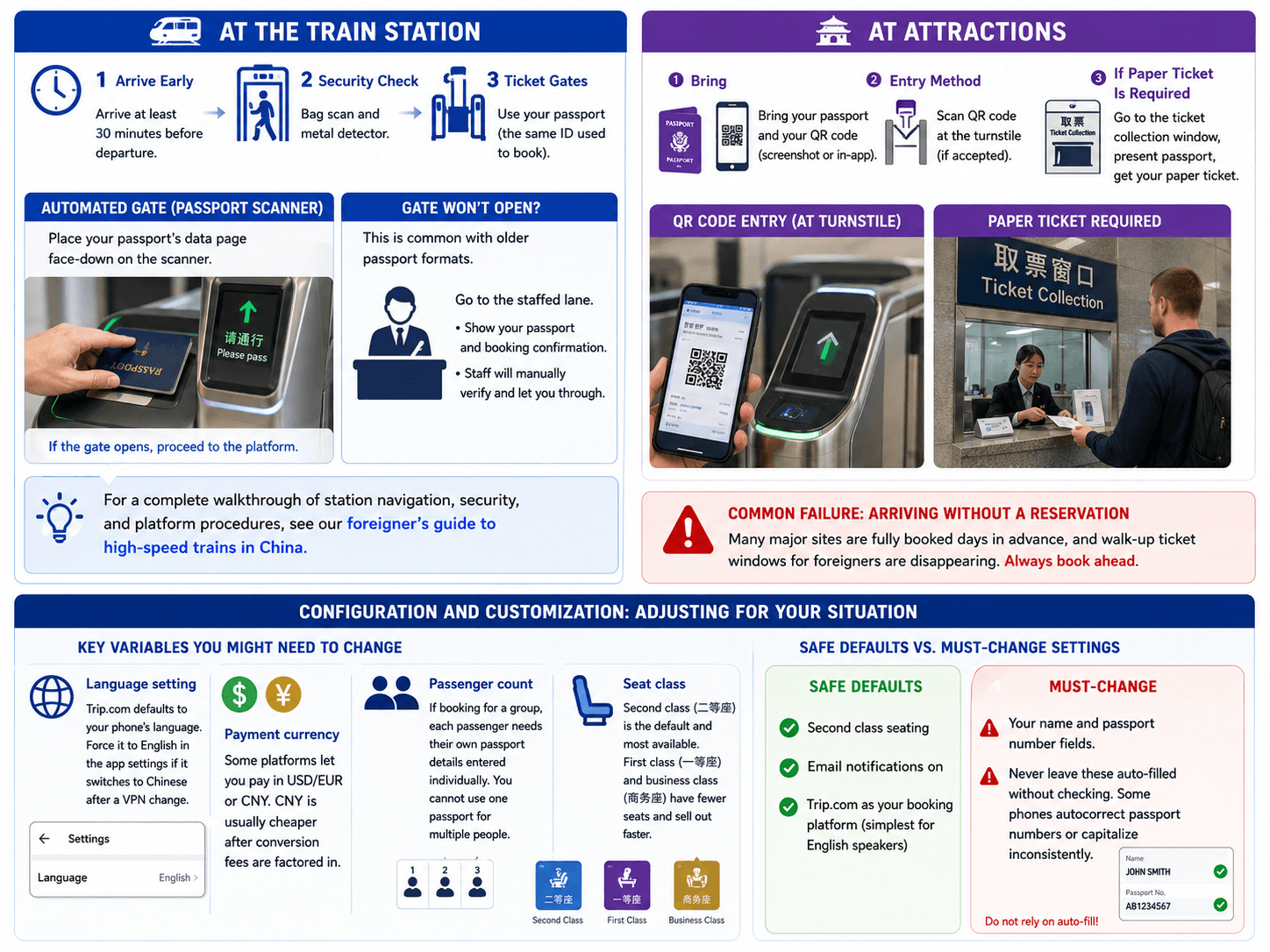
Arrive at the station at least 30 minutes before departure. You’ll pass through security (bag scan and metal detector), then approach the ticket gates. Foreign passengers board using the same valid ID document used to purchase the ticket, which means your passport.
Most high-speed rail stations have automated gates with passport scanners. Place your passport’s data page face-down on the scanner. If the gate doesn’t open (common with older passport formats), go to the staffed lane. Show your passport and booking confirmation. Staff will manually verify and let you through.
For a complete walkthrough of station navigation, security, and platform procedures, see our foreigner’s guide to high-speed trains in China.
Attractions
Bring your passport and your QR code (screenshot or in-app). At venues that accept QR codes, scan at the turnstile. At venues requiring paper tickets, find the ticket collection window (often labeled “取票” or “Ticket Collection”), present your passport, and receive your physical ticket.
Common failure: Arriving at a popular attraction without a reservation. Many major sites are fully booked days in advance, and walk-up ticket windows for foreigners are disappearing. Always book ahead.
Configuration and Customization: Adjusting for Your Situation
Key Variables You Might Need to Change
- Language setting: Trip.com defaults to your phone’s language. Force it to English in the app settings if it switches to Chinese after a VPN change.
- Payment currency: Some platforms let you pay in USD/EUR or CNY. CNY is usually cheaper after conversion fees are factored in.
- Passenger count: If booking for a group, each passenger needs their own passport details entered individually. You cannot use one passport for multiple people.
- Seat class: Second class (二等座) is the default and most available. First class (一等座) and business class (商务座) have fewer seats and sell out faster.
Safe Defaults vs. Must-Change Settings
Safe defaults: Second class seating, email notifications on, Trip.com as your booking platform (simplest for English speakers).
Must-change: Your name and passport number fields. Never leave these auto-filled without checking. Some phones autocorrect passport numbers or capitalize inconsistently.
Verification and Testing: Confirm Your Ticket Works Before Travel Day
Run this checklist 24 hours before your travel date:
- Open your booking app and confirm the order status is “Ticketed” or “Confirmed”
- Screenshot your QR code, order number, and booking details
- Verify your passport number on the booking matches your physical passport
- Check that your departure time and station are correct (many cities have multiple stations)
- Confirm you know which station entrance to use and how to get there
Edge cases to verify: If you changed your passport recently, your booking may be tied to the old number. If you booked through a third party and they used a transliteration of your name, it may not match your passport. If your booking shows a Chinese name alongside your English name, confirm the English version is correct (the Chinese is a phonetic approximation and usually doesn’t affect validation).
Common Errors and Fixes for the Foreigner Ticketing Process
“Identity verification failed” on 12306
Symptom: Your account stays at “未通过” after submitting passport photos.
Cause: Blurry passport photo, glare on the data page, or selfie didn’t match.
Fix: Retake photos in good lighting without flash. Ensure your selfie matches your passport photo (remove glasses, hats). Resubmit and wait another 3–5 days. If urgent, book through Trip.com instead, which handles verification faster.
“Passenger information does not match” at the gate
Symptom: Automated gate won’t open. Staff say your information doesn’t match.
Cause: Passport number typo, name mismatch, or you’re carrying a different passport than the one used to book.
Fix: Go to the station’s ticket service counter (售票处 or 服务中心). Show your passport and booking confirmation. If the error is a minor typo, staff can sometimes correct it. If the passport is entirely different, you’ll need to buy a new ticket.
Payment succeeds but no ticket appears
Symptom: Money is deducted but order shows “Processing” for more than 30 minutes.
Cause: The ticket may have sold out between your selection and payment completion, or the system is experiencing delays.
Fix: Check your order status. If it eventually shows “Refunded” or “Cancelled,” the ticket was unavailable. Rebook immediately. If it stays on “Processing,” contact Trip.com support via in-app chat (24/7 English support available) or call 12306.
QR code rejected at an attraction entrance
Symptom: Turnstile scanner doesn’t recognize your QR code.
Cause: The venue requires a paper ticket, or the QR code is from a third-party app not linked to the venue’s system.
Fix: Go to the ticket collection window with your passport and order number. Staff will issue a physical ticket. For future bookings, check the confirmation email for “collect at venue” instructions.
Booking shows Chinese name only
Symptom: Your booking displays a Chinese transliteration of your name but no English name.
Cause: Some platforms auto-generate a Chinese name from your English input.
Fix: This is usually cosmetic and won’t affect boarding if your passport number is correct. However, verify the English name is stored correctly in your passenger profile. If in doubt, contact support to confirm the passport number on the booking matches yours.
Next Steps: Extending Your China Travel Toolkit
Now that you can reliably complete the ticketing process from payment to valid ticket, you’re ready to tackle the rest of China’s digital travel ecosystem.
- Master local transit: Learn how to navigate China’s metro systems using Alipay QR codes for seamless city travel.
- Book multi-leg journeys: Chain together train tickets for routes like Beijing–Xi’an–Chengdu, building on the same passport-linked profiles you’ve already set up.
- Set up all your essential apps: Payment, maps, translation, and ride-hailing all require setup before you leave your hotel. Our essential apps guide walks through each one.
The hardest part of traveling in China isn’t getting there. It’s making sure the systems recognize you once you arrive. With your identity properly linked across platforms, every subsequent booking gets easier.
Frequently Asked Questions
Sources
- https://chinatravelmag.com/the-essential-apps-that-replace-your-credit-cards-google-maps-and-english-menus-before-you-leave-the-hotel/
- https://us.trip.com/blog/how-to-buy-china-high-speed-rail-tickets-for-foreigners/
- https://www.chinatravelmag.com
- https://unusualnomad.com/china-train-tickets/
- https://chinatravelmag.com/a-foreigners-guide-to-taking-high-speed-trains-in-china/
- https://chinatravelmag.com/chinese-metro-guide-security-alipay-escalator-rules-local-tips/